Showing posts with label sql. Show all posts

A Bit of Transactions and Concurrency in Postgresql

Yesterday, I was in a event, talking about Transactions, ACID, Isolation phaenomena, etc., under Postgresql.

In Postgresql or any other DBMS, Transactions might be running in sequence (serializable) or concurrently, depending on the Isolation level set (they are implemented by DBMS vendors in their own way).


The exagerated simple database table presented above, its two records of bank account holders and their balances, will be used for this article.

The focus of the discussion is about concurrent Transactions with READ COMMITED Isolation Level (default in Postgresql), but also demonstrating two transactions running, one SERIALIZABLE, and the other READ COMMITED.


READ COMMITED vs READ COMMITED


Two transactions were started. Observe the CLOCK icons on PgAdmin, indicating that a Transaction is in progress (on each Query Tool window)...


On the left: the balance of Steve Jobs was already updated to 1100

On the right: Steve Jobs still have 1000 of balance. Why?

Postgresql default Isolation level is READ COMMITED, which does not allow DIRTY READ phaenomena (data which is not commited yet by one Transaction, is visible to other Transactions).


Adding More Money


On the left: the Transaction didn't finished, yet.

On the right: more money to Steve Jobs account, but the query doesn't finish...

The database table accounts is locked by the Transaction on the left. Only when this Transaction finishes (COMMIT), is when the Transaction on the right will add 400 bucks more on Steve Jobs acccount.


On the left: Transaction has finished and 100 bucks were deposited to Steve Jobs account

On the right: still in progress, but since the Transaction on the left finished (table released from lock), then the Transaction on the right sees a balance of 1100, adding 400 to it.

But why data commited from one Transaction is visible to another Transaction that is in progress?

On Isolation level of READ COMMITED, a Transaction can read data that was COMMITED. That being said, one phaenomena that might happen is what is called NON-REPEATABLE READ, where changes commited by one Transaction in a column, are VISIBLE to Transactions with Isolation Level of READ COMMITED.

If these Transactions read the data again, they might get a different value (NON-REPEATABLE), which might lead to some data inconsistencies during READ and WRITE operations of concurrent Transactions, of course, without affecting the ACID property of "Consistency" (transactions must respect database constraints - e.g. balance >= 0).
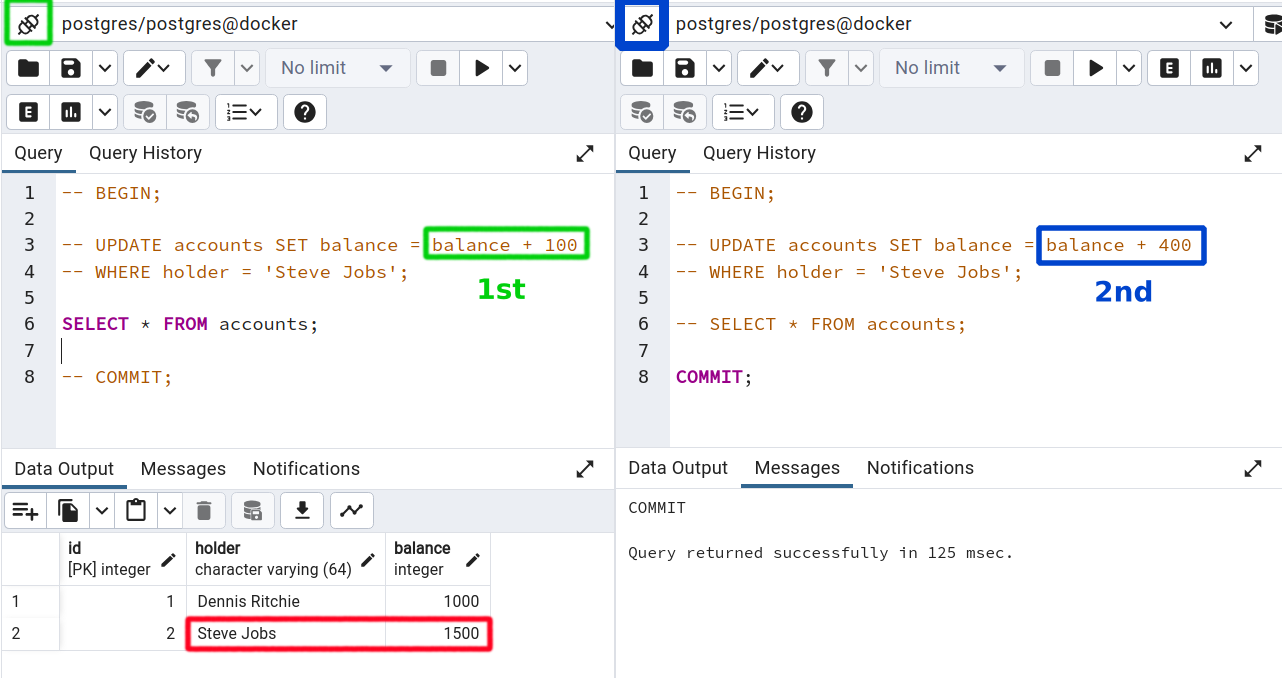

At the end, Transaction on the right has finished, adding 400 bucks more on Steve Jobs account, leaving the account with a balance of 1500 on the left, where no Transaction is in progress.


SERIALIZABLE vs READ COMMITED


Just as before, two Transactions in progress, being the first with Isolation Level SERIALIZABLE.


Records are still the same since the previous example.


Just as the specification, the PHANTOM READ phaenomena doesn't happen with a Transaction running with Isolation Level SERIAZABLE...


...even when the READ COMMITED Transaction finishes.

Doesn't matter: SERIAZABLE Transaction will see what's happening on it's snapshot of accounts table, and nothing else that is happening in other Transactions.


Some Reflections

Weaker isolation levels promote more performance (less overhead) at the cost of temporary data inconsistency.

It really depends on the Business Rules that govern the design of a Backend service, to determine which Isolation Level best suits. Maybe a PHANTOM READ or a NONREPETABLE READ might not cause any trouble in terms of UX for an application that is performing operations on the Stock Market (prices fluctuating from seconds to seconds), but maybe for an E-commerce solution, having a price changed all of sudden for a product that is current under a sell/buy transaction with an User, is not the best scenario: would be bad to start the acquisition of a product that costs U$ 100.00, and in the middle of the transaction (before paying), the price increases to U$ 125.00.

If you have any questions, I'd be glad to address them.

Your Own Repo @ Docker Hub

I just want to have a Docker Image of Postgresql on Docker Hub, with preloaded data saved, so I can pull it and create a container whenever I want, even sharing the image with other people for testing general stuff (just as a code repo on Github). I also want to update the preloaded data with data that I'm currently working on, for personal projects (never including sensitive data).

Hope these instructions might help you too, Developer or SysAdmin.


Requirements

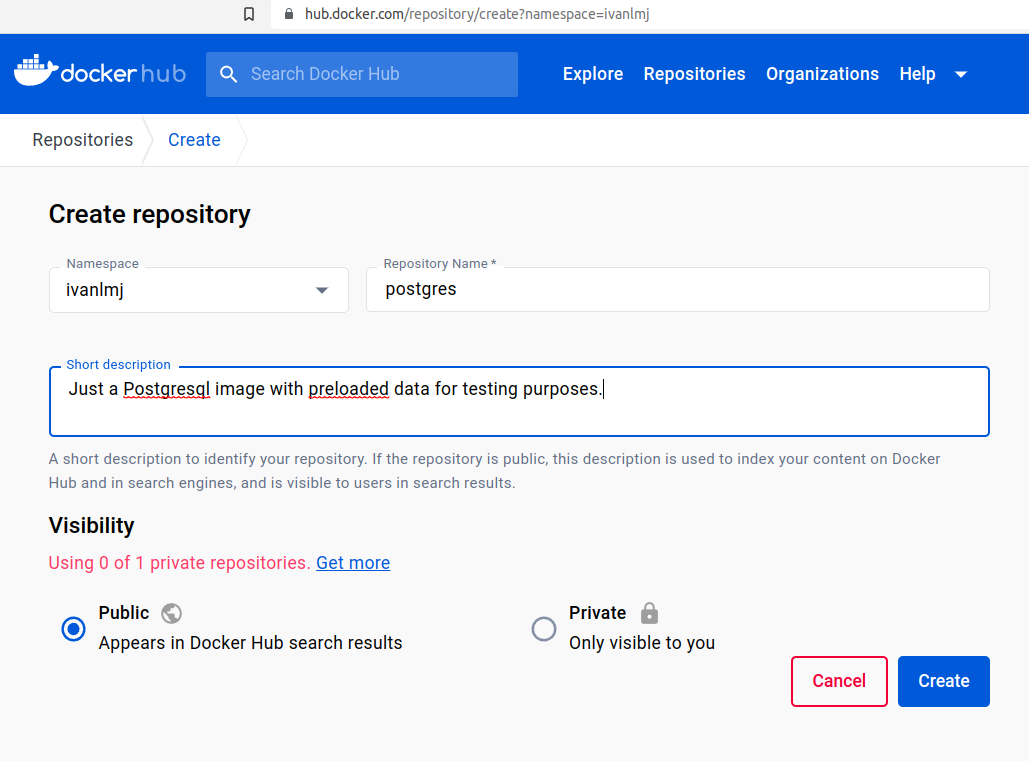
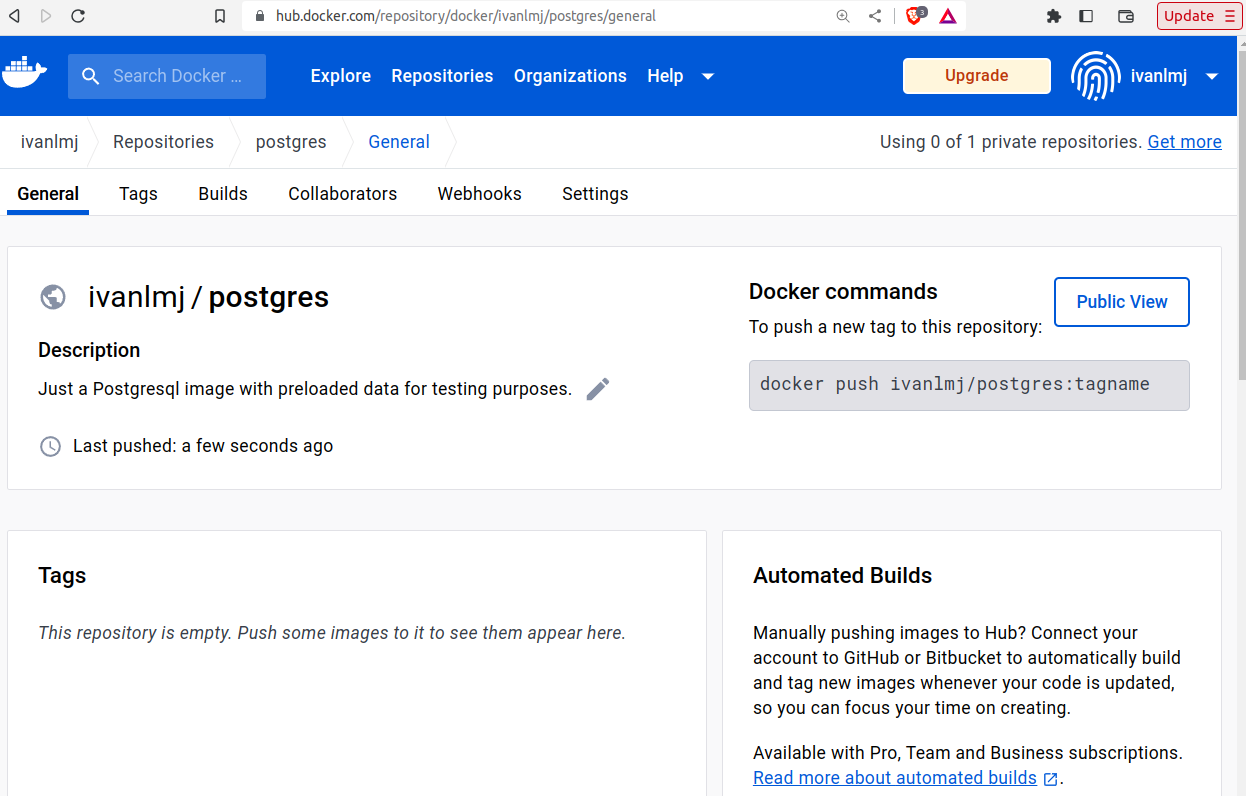
Of course, having a Docker Hub account, with Docker engine installed and Docker client authenticated, are necessary in order to work with Docker. But besides that, without having a image repo created on Docker Hub, there's no place to upload locally built images.

This is the repo which I created:


Postgresql-based Container

First, I need to create a container based on Postgres official image repo (version 12).

I used to be more detail-oriented on creating containers (docker pull, docker create and docker start), but for the general operations, docker run is way more practical:

$ docker run -p 5432:5432 -e POSTGRES_PASSWORD=postgres -d postgres:12
Unable to find image 'postgres:12' locally
12: Pulling from library/postgres
a803e7c4b030: Pull complete 
89aefdc7e2ee: Pull complete 
9ed34906f4b2: Pull complete 
731d5308799a: Pull complete 
91955551cb08: Pull complete 
f3e0af904c74: Pull complete 
906febd4182a: Pull complete 
e7f594a72a36: Pull complete 
0857ffe75e3a: Pull complete 
29faa49de6a6: Pull complete 
de18a1e43334: Pull complete 
caec1f1d9715: Pull complete 
c75a666c6c4d: Pull complete 
Digest: sha256:81ab067d5573cdd38f6dac3de637aa1d6e923c3504bd93a79f1fb397675342f4
Status: Downloaded newer image for postgres:12
22f9858b88b5c8fca20bf7263aca18a4335836b6519bdebfa50d99823979113d


Creating Some Data

By the way, I'm taking a course on advanced DBMS topics, and for the tests that I need right now, this is enough:

$ psql -U postgres -h 127.0.0.1
Password for user postgres: 
psql (12.16 (Ubuntu 12.16-0ubuntu0.20.04.1))
Type "help" for help.

postgres=# CREATE TABLE accounts (id SERIAL PRIMARY KEY UNIQUE NOT NULL, holder VARCHAR(64) NOT NULL, balance INTEGER NOT NULL);
CREATE TABLE
postgres=# INSERT INTO accounts (holder, balance) VALUES ('Dennis Ritchie', 1000), ('Steve Jobs', 1000);
INSERT 0 2
postgres=# SELECT * FROM accounts;
 id |     holder     | balance 
----+----------------+---------
  1 | Dennis Ritchie |    1000
  2 | Steve Jobs     |    1000
(2 rows)

postgres=# exit


Preloaded Image with Dump

The custom Postgresql image that I'm going to create, will require this dump, in order to preload the containers (creating table + insert records):

$ pg_dump -U postgres -h 127.0.0.1 > postgres_db_dump.sql


Building Custom Image

I used postgres:12 image before, in order to build the container where the dump was generated. Since the image is locally cached, it will not require further download, while building the custom image.

Besides storing the dump in /docker-entrypoint-initdb.d/ directory (Postgres will execute the .sql files which are inside of it), the environment variable POSTGRES_PASSWORD will also be set during building level, in order to not require password of postgres user, while building containers based on this custom Postgres image:

$ cat << EOF > Dockerfile
> FROM postgres:12
> ENV POSTGRES_PASSWORD=postgres
> COPY postgres_db_dump.sql /docker-entrypoint-initdb.d/
> EOF

Building an image based on Dockerfile, requires the definition of a tag (version) of the image.

I'm gonna use the version of Postgresql engine (12), since later on, I might want to have another custom Postgresql, but for the newest version, say 16:

$ docker image build . -t ivanlmj/postgres:12
[+] Building 0.0s (7/7) FINISHED                                          
 => [internal] load build definition from Dockerfile                      0.0s
 => => transferring dockerfile: 140B                                      0.0s
 => [internal] load .dockerignore                                         0.0s
 => => transferring context: 2B                                           0.0s
 => [internal] load metadata for docker.io/library/postgres:12            0.0s
 => [internal] load build context                                         0.0s
 => => transferring context: 42B                                          0.0s
 => [1/2] FROM docker.io/library/postgres:12                              0.0s
 => CACHED [2/2] COPY postgres_db_dump.sql /docker-entrypoint-initdb.d/   0.0s
 => exporting to image                                                    0.0s
 => => exporting layers                                                   0.0s
 => => writing image sha256:a6e4657bdcaadf7536bead9eb....                 0.0s
 => => naming to docker.io/ivanlmj/postgres:12                            0.0s


Pushing to Repo

$ docker push ivanlmj/postgres:12
The push refers to repository [docker.io/ivanlmj/postgres]
3ab18e48bca6: Layer already exists 
f807adebe19a: Layer already exists 
19b47a8895e5: Layer already exists 
8b806c56785b: Layer already exists 
cf3b6ab8b6e9: Layer already exists 
c3d26035203f: Layer already exists 
9bb81d691b8a: Layer already exists 
572272d8013b: Layer already exists 
78f5cd522124: Layer already exists 
4e9de6962b22: Layer already exists 
6722c8542886: Layer already exists 
20fde8a4b2e7: Layer already exists 
8fb3f4d77297: Layer already exists 
d310e774110a: Layer already exists 
12: digest: sha256:fa9cf0626b33882c2d71b4e8fffec87691b...  size: 3247


Container Based on Custom Image (testing)

Since the image was built with the environment variable with the password of postgres user, there's no need to set it when creating a container:

$ docker run -p 5432:5432 -d ivanlmj/postgres:12
b8de9890aed0600ba53cfbe5d3b4efdada6460b669b19373406cf36a379d621f

$ docker ps
CONTAINER ID   IMAGE                 COMMAND                  CREATED         STATUS        PORTS                                       NAMES
b8de9890aed0   ivanlmj/postgres:12   "docker-entrypoint.s…"   2 seconds ago   Up 1 second   0.0.0.0:5432->5432/tcp, :::5432->5432/tcp   admiring_mclean

Connecting via host client to published port 5432, works just fine, and the data instrcuted by the dump, is present on the container database:

$ psql -U postgres -h 127.0.0.1
Password for user postgres: 
psql (12.16 (Ubuntu 12.16-0ubuntu0.20.04.1))
Type "help" for help.

postgres=# SELECT * FROM accounts;
 id |     holder     | balance 
----+----------------+---------
  1 | Dennis Ritchie |    1000
  2 | Steve Jobs     |    1000
(2 rows)

Postgresql and Where the Wild Things Are: databases, tables and everything

I'd generally just search some directory inside /var, which might be quite obvious, but nothing will be better than reviewing the configuration that Postgresql is considering for its internal management. We don't want to do things in a remaining folder from a previous installation, so better know where we are. Plus, it's a safe way to access configuration files, independently of which distro or OS are you using. In my case, I want to know: where are the databases and tables inside the filesystem?

These are my databases:

postgres=# \l
                                 List of databases
   Name    |  Owner   | Encoding |  Collate   |   Ctype    |   Access privileges   
-----------+----------+----------+------------+------------+-----------------------
 instagram | postgres | UTF8     | en_US.utf8 | en_US.utf8 | 
 postgres  | postgres | UTF8     | en_US.utf8 | en_US.utf8 | 
 template0 | postgres | UTF8     | en_US.utf8 | en_US.utf8 | =c/postgres          +
           |          |          |            |            | postgres=CTc/postgres
 template1 | postgres | UTF8     | en_US.utf8 | en_US.utf8 | =c/postgres          +
           |          |          |            |            | postgres=CTc/postgres
(4 rows)


Postgresql run-time configuration can be inspected via SHOW command on a PSQL shell. The configuration that matters here is data_directory:

postgres=# SHOW data_directory;
      data_directory      
--------------------------
 /var/lib/postgresql/data
(1 row)


Since I'm using Postgresql in a Docker container, I'll spawn a shell inside the container in order to navigate through the filesystem:

~ $ docker ps | grep lab_postgres
24999bd8c9ef   postgres   "docker-entrypoint.s…"   2 months ago   Up 5 hours   5432/tcp   lab_postgres
~ $ docker exec -it lab_postgres bash
root@24999bd8c9ef:/# cd /var/lib/postgresql/data

root@24999bd8c9ef:/var/lib/postgresql/data# ls -l
total 124
drwx------ 6 postgres postgres  4096 Jan 29 20:23 base
drwx------ 2 postgres postgres  4096 Jan 29 20:28 global
drwx------ 2 postgres postgres  4096 Nov 28 19:21 pg_commit_ts
drwx------ 2 postgres postgres  4096 Nov 28 19:21 pg_dynshmem
-rw------- 1 postgres postgres  4782 Nov 28 19:21 pg_hba.conf
-rw------- 1 postgres postgres  1636 Nov 28 19:21 pg_ident.conf
drwx------ 4 postgres postgres  4096 Jan 29 20:43 pg_logical
drwx------ 4 postgres postgres  4096 Nov 28 19:21 pg_multixact
drwx------ 2 postgres postgres  4096 Nov 28 19:21 pg_notify
drwx------ 2 postgres postgres  4096 Nov 28 19:21 pg_replslot
drwx------ 2 postgres postgres  4096 Nov 28 19:21 pg_serial
drwx------ 2 postgres postgres  4096 Nov 28 19:21 pg_snapshots
drwx------ 2 postgres postgres  4096 Jan 29 20:18 pg_stat
drwx------ 2 postgres postgres  4096 Jan 30 01:26 pg_stat_tmp
drwx------ 2 postgres postgres  4096 Nov 28 19:21 pg_subtrans
drwx------ 2 postgres postgres  4096 Nov 28 19:21 pg_tblspc
drwx------ 2 postgres postgres  4096 Nov 28 19:21 pg_twophase
-rw------- 1 postgres postgres     3 Nov 28 19:21 PG_VERSION
drwx------ 3 postgres postgres  4096 Jan 29 20:40 pg_wal
drwx------ 2 postgres postgres  4096 Nov 28 19:21 pg_xact
-rw------- 1 postgres postgres    88 Nov 28 19:21 postgresql.auto.conf
-rw------- 1 postgres postgres 28085 Nov 28 19:21 postgresql.conf
-rw------- 1 postgres postgres    36 Jan 29 20:18 postmaster.opts
-rw------- 1 postgres postgres    94 Jan 29 20:18 postmaster.pid


There are config files and directories, including a particular directory called "base":

root@24999bd8c9ef:/var/lib/postgresql/data# cd base/
root@24999bd8c9ef:/var/lib/postgresql/data/base# ls -l
total 32
drwx------ 2 postgres postgres  4096 Nov 28 19:21 1
drwx------ 2 postgres postgres  4096 Nov 28 19:21 13394
drwx------ 2 postgres postgres 12288 Jan 29 20:27 13395
drwx------ 2 postgres postgres 12288 Jan 29 20:36 16736


These directories are listed on the system catalog pg_database.

The numbers are OIDs for the available databases:

  oid  |  datname  | datdba | encoding | datcollate |  datctype  | datistemplate | datallowconn | datconnlimit | datlastsysoid | datfrozenxid | datminmxid | dattablespace |               datacl                
-------+-----------+--------+----------+------------+------------+---------------+--------------+--------------+---------------+--------------+------------+---------------+-------------------------------------
     1 | template1 |     10 |        6 | en_US.utf8 | en_US.utf8 | t             | t            |           -1 |         13394 |          479 |          1 |          1663 | {=c/postgres,postgres=CTc/postgres}
 13394 | template0 |     10 |        6 | en_US.utf8 | en_US.utf8 | t             | f            |           -1 |         13394 |          479 |          1 |          1663 | {=c/postgres,postgres=CTc/postgres}
 13395 | postgres  |     10 |        6 | en_US.utf8 | en_US.utf8 | f             | t            |           -1 |         13394 |          479 |          1 |          1663 | 
 16736 | instagram |     10 |        6 | en_US.utf8 | en_US.utf8 | f             | t            |           -1 |         13394 |          479 |          1 |          1663 | 
(4 rows)


Let's enter on the directory that corresponds to the postgres database:

root@24999bd8c9ef:/var/lib/postgresql/data/base# cd 16736/
root@24999bd8c9ef:/var/lib/postgresql/data/base/16736# ls
112	   16739_vm   16871_fsm  2607_vm   2656  2704	   3351      3601      4160
113	   16746      16871_vm	 2608	   2657  2753	   3379      3601_fsm  4161
1247	   16748      16875	 2608_fsm  2658  2753_fsm  3380      3601_vm   4162
1247_fsm   16749      16877	 2608_vm   2659  2753_vm   3381      3602      4163
1247_vm    16751      16889	 2609	   2660  2754	   3394      3602_fsm  4164
1249	   16753      16891	 2609_fsm  2661  2755	   3394_fsm  3602_vm   4165
1249_fsm   16753_fsm  16891_fsm  2609_vm   2662  2756	   3394_vm   3603      4166
1249_vm    16753_vm   16891_vm	 2610	   2663  2757	   3395      3603_fsm  4167
1255	   16761      16896	 2610_fsm  2664  2830	   3429      3603_vm   4168
1255_fsm   16768      16898	 2610_vm   2665  2831	   3430      3604      4169
1255_vm    16770      174	 2611	   2666  2832	   3431      3605      4170
1259	   16770_fsm  175	 2612	   2667  2833	   3433      3606      4171
1259_fsm   16770_vm   2187	 2612_fsm  2668  2834	   3439      3607      4172
1259_vm    16776      2224	 2612_vm   2669  2835	   3440      3608      4173
13245	   16788      2328	 2613	   2670  2836	   3455      3609      4174
13245_fsm  16790      2336	 2615	   2673  2837	   3456      3712      5002
13245_vm   16790_fsm  2337	 2615_fsm  2674  2838	   3456_fsm  3764      548
13247	   16790_vm   2579	 2615_vm   2675  2838_fsm  3456_vm   3764_fsm  549
13249	   16796      2600	 2616	   2678  2838_vm   3466      3764_vm   6102
13250	   16798      2600_fsm	 2616_fsm  2679  2839	   3467      3766      6104
13250_fsm  16815      2600_vm	 2616_vm   2680  2840	   3468      3767      6106
13250_vm   16817      2601	 2617	   2681  2840_fsm  3501      3997      6110
13252	   16817_fsm  2601_fsm	 2617_fsm  2682  2840_vm   3502      4143      6111
13254	   16817_vm   2601_vm	 2617_vm   2683  2841	   3503      4144      6112
13255	   16823      2602	 2618	   2684  2995	   3534      4145      6113
13255_fsm  16825      2602_fsm	 2618_fsm  2685  2996	   3541      4146      6117
13255_vm   16837      2602_vm	 2618_vm   2686  3079	   3541_fsm  4147      826
13257	   16839      2603	 2619	   2687  3079_fsm  3541_vm   4148      827
13259	   16839_fsm  2603_fsm	 2619_fsm  2688  3079_vm   3542      4149      828
13260	   16839_vm   2603_vm	 2619_vm   2689  3080	   3574      4150      pg_filenode.map
13260_fsm  16844      2604	 2620	   2690  3081	   3575      4151      pg_internal.init
13260_vm   16846      2605	 2620_fsm  2691  3085	   3576      4152      PG_VERSION
13262	   16858      2605_fsm	 2620_vm   2692  3118	   3596      4153
13264	   16860      2605_vm	 2650	   2693  3119	   3597      4154
1417	   16860_fsm  2606	 2651	   2696  3164	   3598      4155
1418	   16865      2606_fsm	 2652	   2699  3256	   3599      4156
16737	   16867      2606_vm	 2653	   2701  3257	   3600      4157
16739	   16869      2607	 2654	   2702  3258	   3600_fsm  4158
16739_fsm  16871      2607_fsm	 2655	   2703  3350	   3600_vm   4159


There are a lot of files and all these numbers are (again) OIDs listed in another system catalog called pg_class. The files that have just a number on its name, are the pure tables inside the postgres database (16736).

For example, from these files, which one could be the one that is the table pg_user? Let's find out:

postgres=# SELECT oid, relname FROM pg_class WHERE relname = 'pg_user';
 12098 | pg_user


Let's inspect this table:

postgres=# \d pg_user;
 usename      | name                     |           |          | 
 usesysid     | oid                      |           |          | 
 usecreatedb  | boolean                  |           |          | 
 usesuper     | boolean                  |           |          | 
 userepl      | boolean                  |           |          | 
 usebypassrls | boolean                  |           |          | 
 passwd       | text                     |           |          | 
 valuntil     | timestamp with time zone |           |          | 
 useconfig    | text[]                   | C         |          | 

postgres=# SELECT * FROM pg_user;
 postgres|10  | t      | t      | t      | t         | ******** |          |


Indeed, is the table that holds user data from Postgres. I don't think I'm going to use this knowledge that much, to be honest. But at least, from now and on, I can have an idea of where all Postgres data is stored and how Postgres catalogs the data for its internal management. One more lesson learned :).

Mastodon